
On-call rotation and shift scheduling, in the same app as your hours
The on-call rota lives in a spreadsheet, someone forgets they are on duty, and a swap takes three phone calls. In iTrackFlow, shift plans fill the calendar months ahead, rotate the people for you, skip anyone on approved leave, and let colleagues swap with a lead's approval.
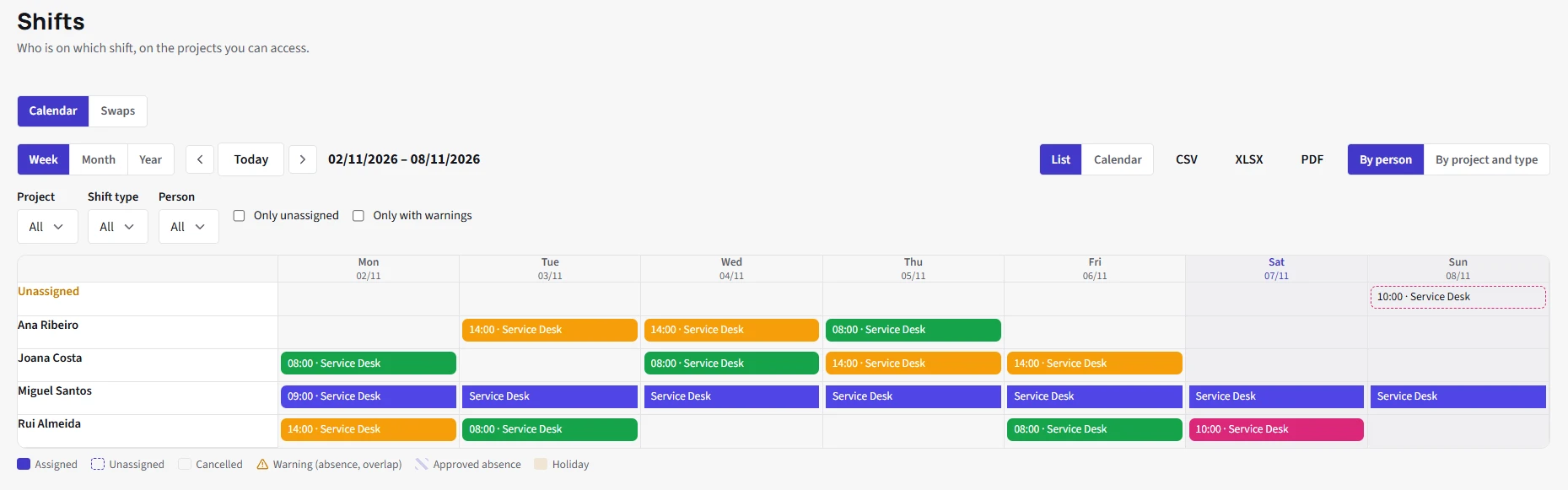
How shift plans work
Shifts belong to a project. You define the kinds of shift once, then a plan puts them together with the people who do them and the order they rotate in.
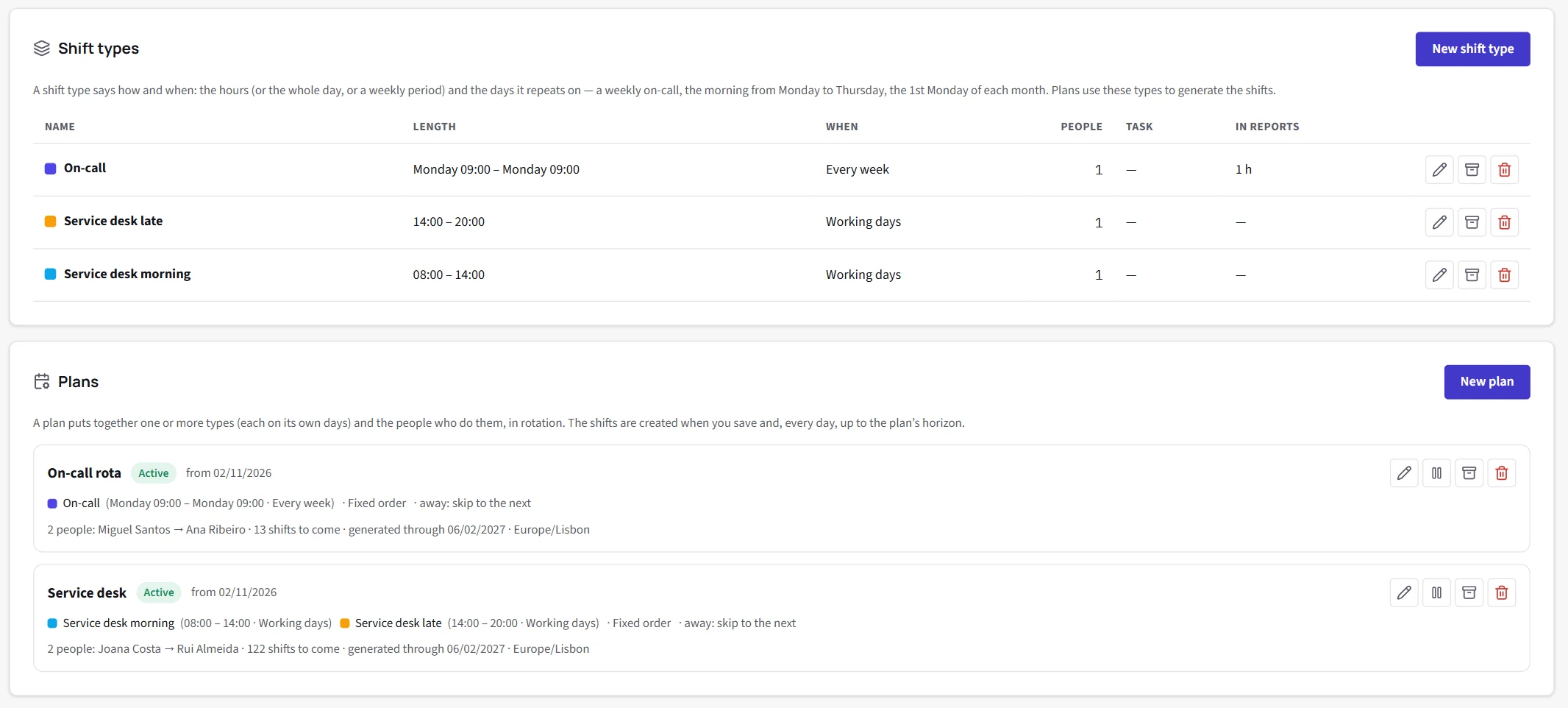
Shift types with their own pattern
A shift type says how long a shift lasts and when it repeats. It can be a block of hours, crossing midnight if needed, a whole day, or a weekly period such as on-call from Monday 09:00 to the next Monday 09:00.
- Every day, working days, chosen weekdays
- Day 15 of the month, the 1st working day, the first Monday or the last Friday
- Holidays skipped when you ask, and more than one person per shift
Swaps without the phone calls
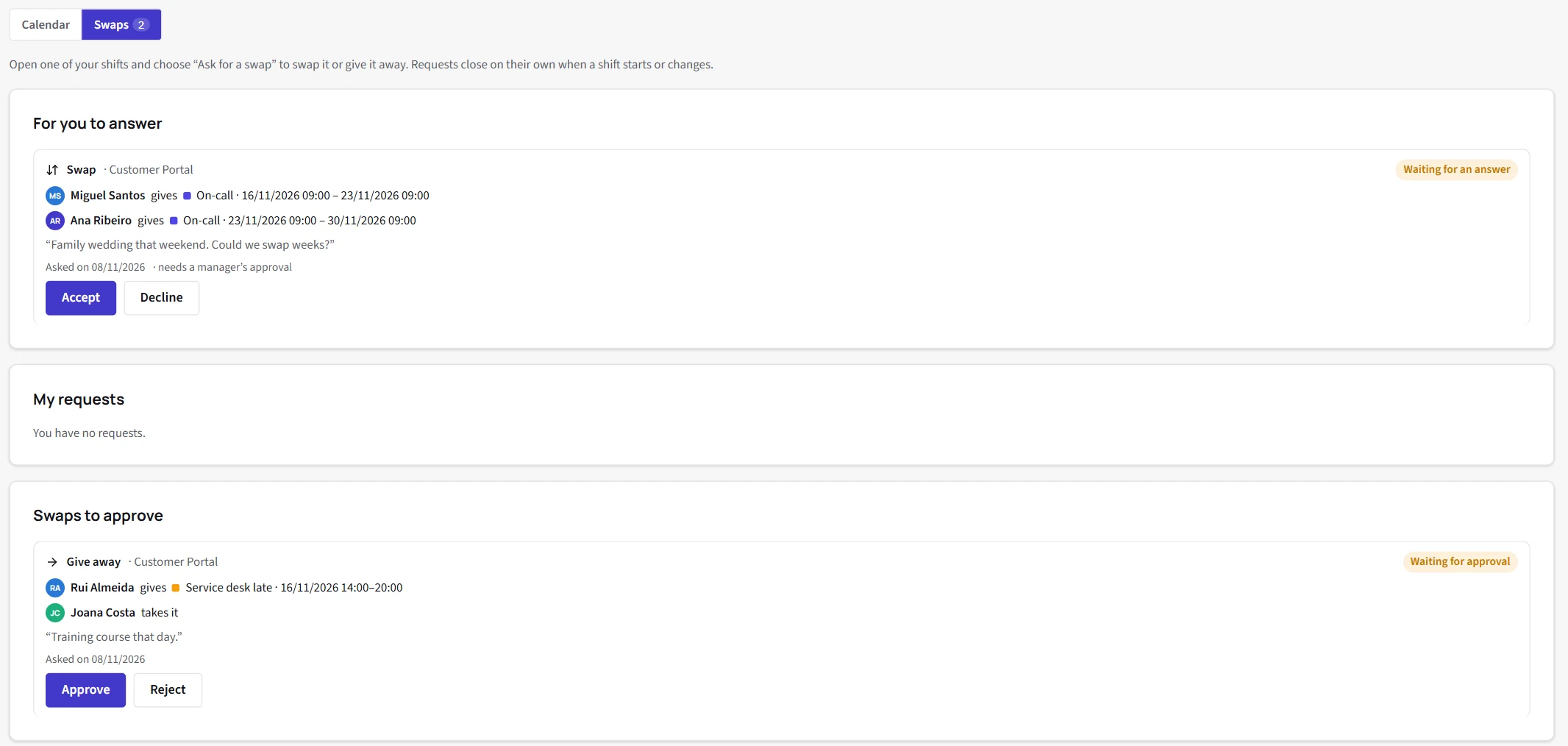
Anyone on a shift can ask a colleague to swap it for one of theirs, or to take it. The colleague accepts and, when the plan asks for it, a project lead approves. Leads can also swap two people's shifts directly.
- Warnings when the colleague is away or already on a shift at that time
- Everyone involved is told in the app and by email
- A request closes on its own if the shift starts or changes
A rotation that knows who is away
A plan rotates its people in a fixed order, or you assign them by hand. Someone on approved time off is skipped and the next person takes the shift, or the shift is left unassigned if you prefer. Hand-edited shifts are kept when the plan changes.
The calendar, three ways
By week, month or year, by person or by project and type, with absences and holidays in the same grid. Export it as a list in CSV, Excel or PDF, or as a calendar in Excel or PDF.
Reminders and gaps
People are reminded of their shift the evening before. Leads are told every morning about shifts in the next seven days that still have nobody on them.
Shifts and hours stay separate
Shifts never create time entries. A shift type can count a number of hours in the reports, for example one hour per on-call week, and you include them only when you choose.
Shift and on-call questions
Who can create and change shift plans?
Owners, admins and the approvers of the project. Everyone else with access to the project sees the calendar and their own shifts.
What happens when I change a plan?
Before you save, iTrackFlow shows how many shifts to come will be created, changed or removed. Shifts that already started stay as they are, and shifts edited by hand are kept.
Do swaps always need approval?
Only when the plan asks for it, which is the default. A lead can turn it off for a plan, and shifts added outside a plan always need it.
Can people see their shifts on the phone?
Yes. The mobile version shows your shifts for the week and lets you answer the swap requests waiting for you. The home page on the computer shows this week's shifts too.
Does a shift count as worked time?
No. A shift says who is on duty; the hours actually worked are still logged as time entries. A shift type can add a fixed number of hours to the reports when you tick "Include shifts", counted from the moment the shift starts.
Everyone knows who is on call
Every feature is included in the 30-day trial, with no credit card.